Your review is not carved in stone. Experiences evolve — a company fixes the problem, a replacement arrives, or a great first impression sours after a warranty claim. TrustRating lets you edit or delete any review you wrote, at any time, and this article explains exactly what each action does: to the review, to its published status, and to the company's TrustScore.
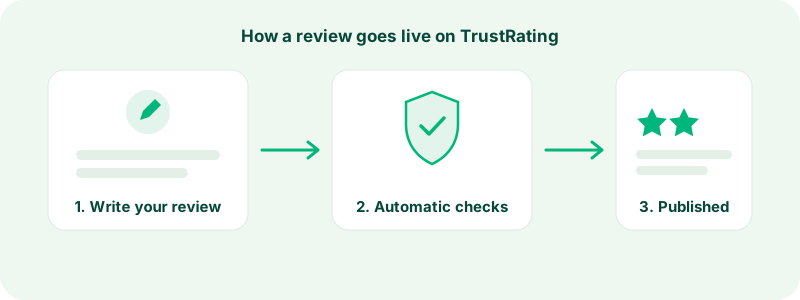
The one thing to internalize before anything else: an edited review is re-checked before it goes public again. That is not a punishment — it is the same integrity pipeline every review passes through, applied to the new text you just wrote. Plan for a short gap between saving an edit and seeing it live.
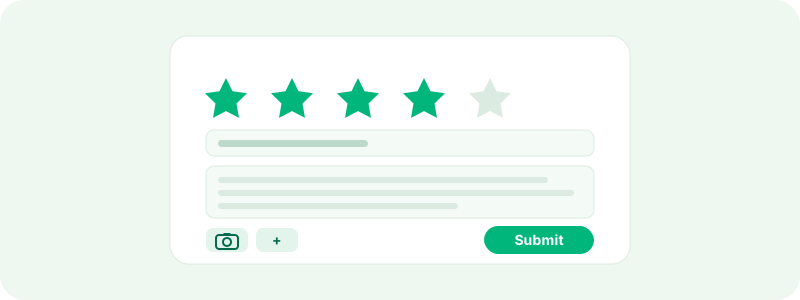
How to edit a review
Sign in and open the reviews section of your account, where every review you have written is listed with its current status. Choose the review, select edit, and you can change all three parts: the star rating, the title, and the body. The same form and the same rules apply as when you wrote it — own experience only, no personal data about staff, no links or promotion, and the text should still say what the stars say.
When you save, two things happen:
- The review returns to pending. The edited version is treated as new content: it leaves the public page and goes back through the checks described in what happens after you submit a review. Once it clears, it republishes with your changes.
- The review is marked as edited. The edit timestamp is recorded, which keeps the record honest for readers and moderators alike.
If the review was already published, its rating temporarily stops counting toward the company's TrustScore while the edited version is re-checked, then counts again — at its new value — when it republishes. Do not be alarmed by the brief disappearance from the company page; that is the pipeline working, not your review being removed.
Tip: When you edit after a dispute is resolved, keep the original story and add what changed rather than rewriting history. "Update: the company contacted me and refunded the order in full" under your original text is the most useful possible outcome for the next reader — it shows both the problem and how the company handled it.
Updating your rating after the company fixes things
This is the most common — and most valuable — reason to edit. Businesses on TrustRating can reply to reviews publicly, and you get a notification when a company replies to yours. Many companies use that reply to make things right: a refund, a replacement, an apology that actually lands.
If that happens, you decide whether it changes your rating. There is no obligation in either direction. Some things to weigh:
- Rate the whole experience, not just the ending. A company that ships a broken product but replaces it quickly might reasonably earn three or four stars — the problem was real, and so was the fix.
- Speed and attitude count. Having to fight for six weeks to get a resolution is a different experience from a proactive fix within a day, even if the end state is identical.
- Never trade stars for compensation. If a company offers you money or gifts specifically in exchange for changing your rating, that violates the guidelines — the honest move is to report it via reporting a review or contact support. A company politely resolving your actual problem, on the other hand, is exactly how the system is supposed to work.
Companies that engage well with critical reviews are also visible to readers directly — see replying to reviews for how that side works.
How to delete a review
From the same reviews section of your account, choose the review and select delete. Deletion is immediate and permanent: the review comes off the company page, off your profile, and out of the platform. There is no trash folder and no restore — if you think you might want the text later, copy it somewhere first.
You do not need anyone's permission to delete your own review, and you do not need to give a reason. It is your account and your words.
Tip: If your experience changed, an edit is almost always more useful than a deletion. A deleted one-star review erases the warning entirely; an updated review with "they eventually fixed it" preserves the truth for everyone.
What deletion does to the company's score
The company's TrustScore is recomputed as soon as your review is deleted. If the review was published, its star rating stops contributing immediately — the score reflects only reviews that are actually on the platform. For companies with a large review base a single deletion barely moves the number; for a company with very few reviews, one deletion can visibly shift it. That is the scoring system working as designed — you can read how the ingredients combine in understanding the TrustScore.
Deleting a review also does not free the company from the feedback in any other sense: replies attached to the review disappear with it, and the review no longer appears anywhere on the platform.
Can you review the same company again?
Yes. There is no one-review-per-company limit on TrustRating. If you have a new, separate experience with a company — a second order, a support case a year later — you can write a new review describing it. Each review must stand on its own as a genuine account of a distinct experience.
What you should not do is repost the same experience multiple times to pile on, or copy-paste identical text into several reviews. Duplicate and near-duplicate content is one of the specific things the automated checks look for, and repeat submissions of the same story will be held or removed. For an ongoing situation, the better pattern is one review that you keep updated through edits.
Reviews and suspended accounts
Account standing affects what you can do with your reviews:
- Review-banned accounts can still sign in, browse, and manage their profile, but cannot post new reviews. A notice in your account explains the restriction, and it can be appealed through support.
- Suspended accounts cannot sign in at all — which also means they cannot edit or delete their reviews while the suspension lasts. Published reviews from a suspended account remain on the platform as part of the public record, and the reviewer's public profile carries a visible suspension label so readers have context. If your account was suspended and you believe it was a mistake, contact support to appeal; if the suspension is lifted, full control of your reviews returns with it.
If you delete your entire account, your published reviews are handled according to the privacy policy — the details of what is removed and what may be retained for integrity purposes are in the legal hub.
Frequently asked questions
"I edited my review and it vanished — is that normal?" Yes. Edited reviews are re-checked before republishing. It will return once it clears; if it seems stuck for a long time, contact support.
"Can I change just the star rating without touching the text?" You edit through the same form, so you can resave the identical text with a new rating. It still goes through re-checking like any other edit.
"Can the company edit or delete my review?" No. Companies can reply publicly and can report reviews they believe break the guidelines, but only you — and platform moderators enforcing the guidelines — can change or remove your review.
"I deleted my review by mistake. Can support restore it?" No — deletion is permanent. You can write a new review describing the same genuine experience.
"Does deleting a review affect my account?" Deleting your own reviews is always allowed and does not penalize you. Like every review action, it is visible to our moderation team, so deleting and reposting in rapid cycles will draw attention.
Still unsure whether to edit, update, or delete? Start from what the next reader needs to know — that is the test that never fails. And if you are about to write the replacement, writing a great review has the full checklist.