TrustRating's automated defenses catch a great deal, but the community is the final safety net. Every published review carries a report option, and every report is looked at by a human moderator. This guide covers what is worth reporting, how to do it, what happens next, and how reporting works for businesses — including how to report an entire company profile.
One principle up front: reporting is for guideline violations, not disagreements. The system exists to remove fake, abusive, and off-topic content — not to silence opinions someone dislikes.
What you can report
When you flag a review, you pick the reason that fits best:
- Fake or paid reviews. The reviewer never seems to have been a customer, the text reads like an advertisement or a template, or you have reason to believe the review was bought — whether glowing praise for the company or a manufactured attack on a competitor.
- Harassment or abuse. Threats, hate speech, slurs, or personal attacks aimed at individuals. Criticism of a company is fine; abuse of people is not.
- Personal data exposure. Reviews that publish someone's full name alongside private details, phone numbers, addresses, account numbers, or anything else that endangers a person's privacy.
- Off-topic content. The review is about a different company, a courier rather than the shop, politics, or anything other than the reviewer's experience with this business.
- Spam and promotional content. Links to other stores, discount codes, affiliate pitches, or reviews written primarily to advertise something.
- Conflicts of interest. Reviews apparently written by the company's own staff, its competitors, or anyone with a stake in the rating rather than a genuine customer experience.
- Other. Anything else that violates the guidelines — the form includes a free-text field where you can explain.
What is not reportable
A review is not in violation simply because it is negative, emotional, or feels unfair. One-star reviews describing genuine bad experiences are exactly what the platform exists to host, and blunt language is allowed. The same applies in reverse: a five-star rave is not fake just because you had a worse experience. Before reporting, ask one question — does this break a rule, or do I just disagree with it? If it is the latter, the better response is to write your own review describing your experience.
How to flag a review, step by step
- Sign in. Reports are tied to accounts — anonymous reporting is not supported, which keeps the system accountable. Your identity is never shown to the review's author.
- Find the report option on the review. Every review card has a compact action row; choose the report (flag) action.
- Pick the reason that best matches the problem from the list above.
- Add details if you can. The optional detail field is where you make the moderator's job easy: "This exact text appears on three other company profiles" is far more actionable than a bare flag.
- Submit. You will see a confirmation that your report was received.
A few mechanics worth knowing: you can report a given review only once (submitting again simply confirms your existing report), and you cannot report your own review — if you want your own review changed or removed, edit or delete it directly.
Tip: Report the review, not the argument. If a review contains both a genuine complaint and a guideline violation, flag it and describe the specific violation — moderators judge the content against the rules, not the sentiment.
What happens after you report
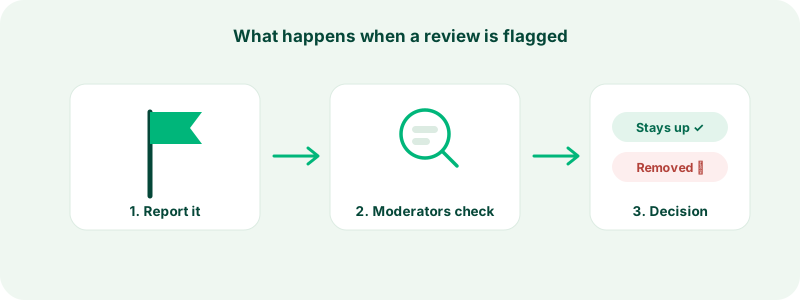
Your report goes straight into a moderation queue that human moderators work through, alongside the evidence our automated systems hold about the review. The investigation ends in one of two outcomes:
- The review stays up. The moderator judged that it does not violate the guidelines. The report is closed and recorded — reports are never simply deleted.
- The review is actioned. The moderator hides or removes the review, and its author is notified with an explanation and a way to dispute the decision.
Two more things happen behind the scenes. First, if several different people independently report the same review, it is escalated automatically: it comes down from the public page and waits in the moderation queue while a moderator takes a closer look. Second, every report becomes part of the review's permanent moderation record, so even a dismissed report adds context if the same review is investigated again later.
TrustRating does not currently send you a personal notification with the outcome of each report. The clearest signal is the review itself — if it violated the guidelines, it will come down once the investigation completes. If you reported something serious and it remains up longer than you would expect, you can follow up through support.
Reporting as a business
If someone leaves a review on your company's profile that you believe violates the guidelines, do not use the consumer flag button — business accounts have a dedicated reporting workflow inside the business area, and the platform will direct you there. Owner reports are clearly tagged for moderators and handled with a response-time commitment, precisely because a business disputing a review on its own profile deserves a documented, accountable process.
The standard is identical, though: reviews are removed for violating guidelines, never for being negative. If the review is genuine criticism, the strongest move available to you is a professional public reply — see replying to reviews.
Reporting a whole company
Sometimes the problem is bigger than one review: a profile impersonating a real brand, a fake storefront running a scam, or a business systematically gaming its own rating. Report these through our contact form — choose the topic that fits and include the company's profile link plus everything you know (the real brand being impersonated, evidence of the scam, suspicious review patterns).
Company-level enforcement has real teeth. Depending on severity, a company can lose access to review collection features, have new reviews disabled entirely, carry a public suspension notice on its profile, or be delisted from search and rankings altogether. Scam and impersonation reports are treated with urgency because they put people's money at risk.
Do not abuse the reporting system
The reporting system is itself protected by the guidelines. Mass-flagging honest negative reviews, coordinating report campaigns against a competitor, or repeatedly reporting content that moderators have already cleared are violations, and accounts that do this face enforcement. Moderators see the full history of every report, so bad-faith patterns are visible. Report honestly and the system stays fast for everyone.
If your own review was reported
Being reported does not remove your review — only a moderator's decision does. If your review is hidden or removed, you will receive a notification explaining the action, and you can appeal by contacting support with your side of the story. Reviews that describe genuine experiences within the guidelines get restored; our page on how we fight fake reviews explains the standards moderators apply.
Common questions
"Will the reviewer know I reported them?" No. Reports are confidential; the author of an actioned review is told which guideline was violated, never who reported it.
"How long does a report take?" Most reports are resolved quickly; escalated and complex cases take longer. Urgent safety issues — scams, personal data exposure — are prioritized.
"Can I report a review I merely suspect is fake?" Yes. You are not expected to prove anything; describe what looks wrong and let moderators combine your report with the evidence they hold.
"Does reporting affect the company's TrustScore?" Not directly. Only a moderation decision that removes a review changes what counts toward the score — see how the TrustScore works.