A great review does two jobs at once. It tells the next customer what actually happened — so they can decide with real information instead of marketing — and it gives the business specific, honest feedback it can act on. Neither job requires you to be a professional writer. It requires you to be concrete, fair, and truthful about your own experience.
This guide walks through the whole process: finding the right company page, choosing a star rating that means what you intend, writing the kind of detail readers actually search for, attaching photos, and staying inside the guidelines so your review publishes smoothly.
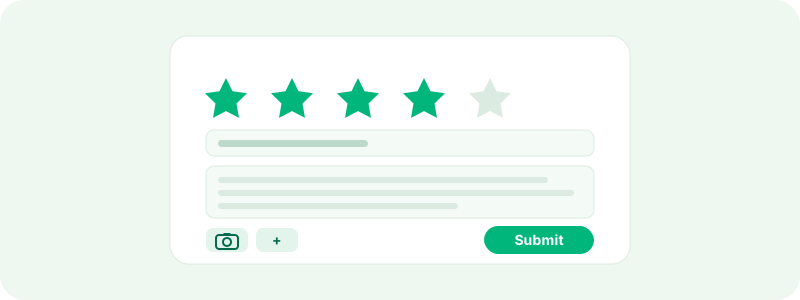
Before you start
Three things are worth knowing up front:
- You review your own experience. TrustRating reviews describe first-hand interactions — something you bought, a service you used, a support conversation you had. Reviews written on behalf of someone else, or about a company you have never dealt with, violate the guidelines and will not survive moderation.
- Reviews are public and tied to a public profile. Your display name appears next to everything you write, and your reviewer profile lists your reviews. If your profile is currently set to private, the review form will ask you to make it public before you can post.
- You do not strictly need an account first. If you are not signed in, you can write the review and enter your email address; we create an account for you and send a confirmation link. Your review will not publish until you click that link — the confirmation is what proves the email is really yours. If you would rather set things up in advance, see creating your account.
One more note: business accounts cannot post reviews. They exist to manage a company profile, and letting them review other companies would be an obvious conflict of interest. If you manage a business but also shop online like everyone else, keep a separate personal account for reviewing.
Step 1: Find the company page
Use the search bar at the top of any page and type the company name or its website domain — the domain is often the more reliable search, since many companies have similar names. You can also browse by category if you are not sure of the exact spelling. Every company profile shows the TrustScore, the star breakdown, and a prominent Write a review button.
If the company is not on TrustRating yet, you can add it yourself. Provide the company name and website, write your review at the same time, and the new profile goes live together with your review once the standard checks complete. You do not need the company's permission — profiles exist for consumers, and any business can be listed.
Step 2: Choose your star rating
The star rating is the number readers scan first and the number that feeds the company's TrustScore, so choose it deliberately rather than by gut feel. A reasonable way to read the scale:
- 1 star — bad. A serious problem the company failed to fix: undelivered orders, refused refunds, misleading claims, being ignored entirely.
- 2 stars — poor. Significant problems, perhaps with a partial or grudging resolution. You would warn friends away.
- 3 stars — average. A mixed experience. Some things worked, some did not; the company was neither impressive nor terrible.
- 4 stars — good. Things worked essentially as promised, with only minor friction. You would use the company again.
- 5 stars — excellent. The company delivered on everything and handled any hiccup quickly and gracefully.
Match the stars to the text. A one-star rating attached to a mostly positive story (or the reverse) confuses readers, and our integrity systems specifically look for ratings that contradict the review content.
Step 3: Write the review itself
You will write a short title and the review body. The title should summarize the experience in one line — "Refund took six weeks and four emails" tells a reader far more than "Disappointed". For the body, the most useful reviews answer three questions:
- What happened? What did you buy or use, and what went right or wrong? Name the product or service if you can.
- When did it happen? Recent context matters. "Ordered in March, delivered in April" lets readers judge whether the review reflects the company today.
- How was it resolved? If something went wrong, did you contact support? How fast did they respond, and did they actually fix it? A company's behavior when things break is exactly what future customers want to know.
A few sentences is the minimum, and there is room for a genuinely detailed account if you have one. You do not need to fill the space — a tight, specific paragraph beats a rambling page. Write in whatever language you are most comfortable in; reviews are shown with a language filter so readers can find yours.
Tip: Write the review while the details are fresh. Order numbers, dates, and the names of what you bought (not the names of staff — see below) make a review credible and hard to dismiss.
Step 4: Add photos if you have them
You can attach up to four photos to a review — the product that arrived, the damage in the packaging, the screenshot of the confirmation. Photos are optional, but they add powerful evidence that words alone cannot. Only images are supported; video is not. Make sure any photo you upload does not include other people's faces or personal information.
The dos and don'ts
Reviews that break these rules get held or removed, so it is worth thirty seconds to check your draft:
Do:
- Describe your own genuine experience, factually and in your own words.
- Include concrete details — dates, what you ordered, how support responded.
- Stay civil, even when the experience was infuriating. Anger is fine; abuse is not.
- Update your review later if the situation changes (see editing or deleting your review).
Don't:
- No profanity or personal attacks. Criticize the company's conduct, not people's character.
- No personal data about staff. Do not publish employees' full names, phone numbers, photos, or anything that identifies a private individual. "The support agent" is enough.
- No links or promotion. Reviews with promotional links, discount codes, or referral offers read as spam and are treated as spam.
- No second-hand stories. "My friend told me…" is not a review. Only first-hand experiences belong here.
- No incentivized reviews. If a company offered you money, gifts, or discounts in exchange for a positive review, do not write it — and consider reporting the company. Mentioning such an offer inside a review is itself a red flag our systems detect.
Verified purchase reviews
Some reviews carry a Verified purchase badge. These come through review invitations: after you buy from a company that uses TrustRating's invitation tools, you receive an email with a personal link, and a review written through that link is automatically tied to your order.
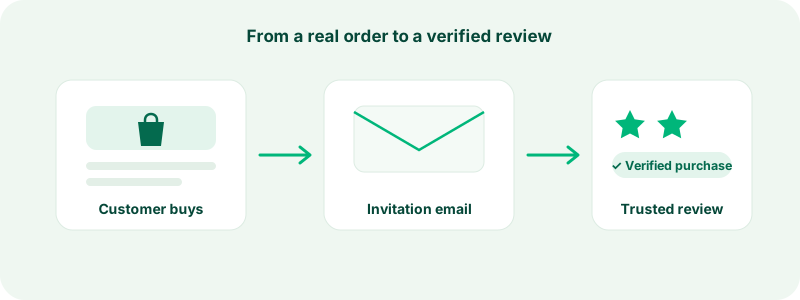
Verified reviews matter for two reasons. Readers weigh them more heavily, because the platform can vouch that a real transaction happened. And they move through our integrity checks more smoothly — a verified purchase is strong evidence of authenticity, so these reviews are far less likely to be held for extra screening. If you received an invitation email, using its link is always the best way to write that review. Invitation links are personal and expire after a while, so do not share them and do not sit on them for months.
Reviews written without an invitation are just as welcome and count just as much toward the TrustScore — they simply will not carry the badge.
What makes a review helpful
Readers can mark reviews as helpful, and the most helpful reviews surface prominently on the company page. Across millions of reviews, the pattern is consistent: helpful reviews are specific, balanced, and current. They say what was bought, what it cost in effort to resolve problems, and whether the reviewer would return. They acknowledge what went well even in a negative review, and what could improve even in a positive one.
Businesses read these reviews too — many reply publicly, and thoughtful criticism regularly gets problems fixed. You can read about how companies engage in replying to reviews.
Troubleshooting
"My review isn't showing on the company page." New reviews pass through automated checks and sometimes a short human moderation step before publishing. This is normal, especially for your first review. The full pipeline is explained in what happens after you submit a review.
"It says I'm posting too quickly." Submission limits protect the platform from automated spam. Wait a little while and try again.
"It says my profile is private." Reviews require a public reviewer profile. Enable it from your profile settings and resubmit — your draft is preserved.
"The form says an account already exists for my email." You have an account from before. Log in and the review will be attributed to it properly.
Ready to publish? Find the company, tell your story honestly, and press submit. Your next stop: what happens after you submit.