The TrustRating API is a JSON REST interface that connects your reputation to the rest of your stack. With it you can pull your company profile, score, and published reviews into your own dashboards and databases, and — going the other direction — create tracked review invitations straight from your order flow, so every completed purchase automatically produces an invitation link without anyone touching the business panel.
This guide takes you from zero to your first successful request: what the API can do, how to create a key, how authentication works, and the mistakes that account for most first-integration support tickets.
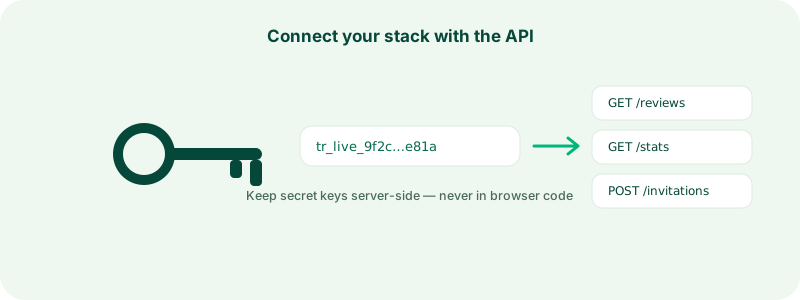
What the API is for
Company-scoped API access covers three jobs:
- Read your public profile data — name, verification state, review count, and your public score, both on the internal scale and as the star rating shown on the site. Useful for internal dashboards, monitoring, and syncing your rating into other systems.
- Read your published reviews — newest first, with pagination, including the reviewer's public display name and your reply where one exists. This is how you mirror reviews into a CRM, a data warehouse, or an internal quality process.
- Create and track review invitations — generate a per-customer tracked review link from your own backend, typically at the order-confirmation moment. TrustRating never emails your customers through this flow: you get a link back and include it in the messages you already send. When the customer reviews through it, the review is tied to your order reference and marked as a verified purchase. You can also list your invitations and filter by delivery status to monitor the pipeline. The full context on why invitations matter is in inviting customers to review.
Keys created in the business panel are scoped to your own company — they can read your data and manage your invitations, never anyone else's.
Creating your first API key
API access is a capability of higher plans; if your plan includes it, the key manager is ready in the panel, and if not, the page will point you at plan options.
- Open the business panel and go to API keys.
- Give the key a descriptive name — name it after the system that will use it ("Shopify backend", "Data warehouse sync"), not after a person.
- Pick its scopes. Read grants the GET endpoints; write grants creating invitations. Issue the narrowest set that does the job — a dashboard integration needs read only.
- Choose a per-minute rate limit for the key, then create it.
The full key — a token starting with tr_ — is displayed once, immediately after creation. Copy it into your secrets manager right away. After that moment the platform stores only a hash; nobody, including support, can show you the key again. If you lose it, revoke it and create a new one. The key list shows each key's prefix, scopes, live usage charts, and last-used time, which makes it easy to spot keys that are unused (revoke them) or busier than expected (investigate them).
Authentication basics
Every request carries the key as a Bearer token in the Authorization header:
curl https://trustrating.ai/api/v1/companies/your-company-slug \
  -H "Authorization: Bearer tr_your_api_key"
That is the entire authentication model — no OAuth dance, no request signing, no session cookies. A missing or invalid key returns 401; a valid key used for something outside its scopes or its company returns 403. Responses are JSON in both directions, and errors always carry a single error message field that is safe to log.
Key security: the rules that matter
An API key is a password for your company's data and invitation pipeline. The rules are the same as for any credential, and they are worth stating plainly:
- Server-side only. Call the API from your backend. Never embed a key in browser JavaScript, a mobile app, or anything else you ship to users — anyone can open dev tools and read it.
- Keep keys out of repositories. Load them from environment variables or a secrets manager. A key committed to git history is compromised even after you delete the line.
- One key per integration. When each system has its own key, you can revoke one integration without breaking the others, and the per-key usage charts tell you exactly who is calling what.
- Rotate on suspicion. Revocation is immediate. If a key may have leaked — a laptop stolen, a log file exposed, a contractor offboarded — revoke it in the panel, create a replacement, and redeploy. Minutes of work, and the old key stops working instantly.
Tip: Check the usage chart on each key occasionally. A key that suddenly shows traffic at 3 a.m. from an integration you know runs hourly during business hours is telling you something.
Rate limits and quotas
Two budgets apply to every key, and the response headers keep you informed about both:
- A per-minute rate limit, set when the key is created. Exceed it and you get
429with a Retry-After header — back off and retry after the indicated pause. - A monthly request quota from your plan, reported in quota headers on every response. Exhausting it also returns
429, but without Retry-After: it resets with your billing period, not a clock window.
Well-behaved integrations read these headers instead of hard-coding assumptions, batch work where possible, and cache responses that do not change minute to minute — your review list does not need refetching every second.
Where the reference documentation lives
This article is the orientation; the contract is in the developer docs at trustrating.ai/developers. That page documents every endpoint with request and response examples, the error catalog, pagination, webhook payloads, and a machine-readable OpenAPI spec you can feed to client generators and API tools. When this guide and the reference ever disagree, trust the reference.
Common first-integration mistakes
Years of support tickets condense to this list:
- Losing the key at creation. It is shown once. Copy it before closing the toast, or you will be revoking and reissuing ten minutes later.
- Calling from the browser. It works in testing, then leaks your key in production. Proxy through your backend from day one.
- Missing the write scope. Creating invitations needs a key with write; a read-only key gets
403on POST. The error message says so, but it is easier to pick scopes correctly upfront. - Ignoring pagination. Review listings are cursor-paginated. If you only ever read the first page, your mirror silently caps out. Follow the cursor until it is null.
- Retrying 4xx errors. A
401or403will not fix itself with retries — it is a key or scope problem. Retry-with-backoff is for429and5xxonly. - Polling for things webhooks push. If you find yourself fetching the review list every minute to notice new reviews, switch to webhooks and get told instead.
Frequently asked questions
"Can I display fetched reviews on my own site?" Yes, with attribution — review payloads include an attribution block, and the developer docs spell out the rules. For the common case of showing your rating on your site, embedded widgets do it with zero code.
"Does API usage cost extra?" API access is part of your plan, subject to its monthly quota. There is no per-request billing.
"Who on my team can manage keys?" Creating and revoking keys is restricted to owner-level access, since keys grant standing access to company data.
"Something returns an error I can't explain." Note the status code, the error message, and the time, then contact support — with those three facts we can usually trace the exact request.